

AI has hit SEO like a bomb.
Everyone is quick to label techniques to optimize for AI traffic, sharing tips and methods for getting cited. The simple truth is that SEO remains pretty much the same, with certain tactics more effective for AI citations than others, such as building brand mentions like we do here at Spyndle.
Tactics aside, what’s more important right now is to be able to track your traffic from AI to see how it is impacting your business. AI traffic remains much smaller than organic, but right now, it is only growing in size.
Let’s take a look at how you can track (and estimate) AI referral traffic.
Tracking Your AI Traffic
Tracking your actual traffic from AI is very easy; it just requires Google Analytics to be set up.
From there, all you need to do is follow these steps:
- Log into your GA4 account
- Go to Report>Acquisition>Traffic Acquisition
- Click ‘Add Filter’
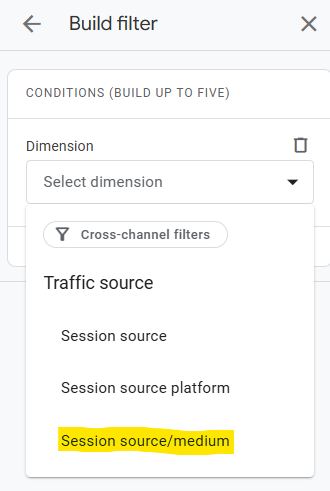
- For dimension, select Session source/medium
- Choose ‘matches partial regex’ as the operation, and then paste the following
^.openai.|.copilot.|.chatgpt.|.gemini.|.gpt.|.neeva.|.writesonic.|.nimble.|.perplexity.|.google.bard.|.bard.google.|.bard.|.edgeservices.|.bnngpt.|.gemini.google.*$
You don’t have to worry about what this means – it’s simply a filter that’s looking for any traffic from the above domains.
For step-by-step instructions with pictures, see below:
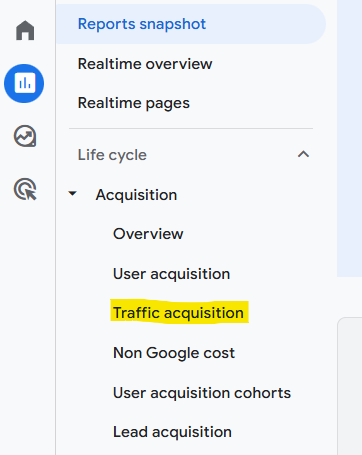
Once there, naviagate to ‘Add filter’.

This will open up a build filter function in the right-hand navigation. Scroll down to ‘Session source’
After that, select ‘matches partial regex’ under match type and then copy in the regex from above.
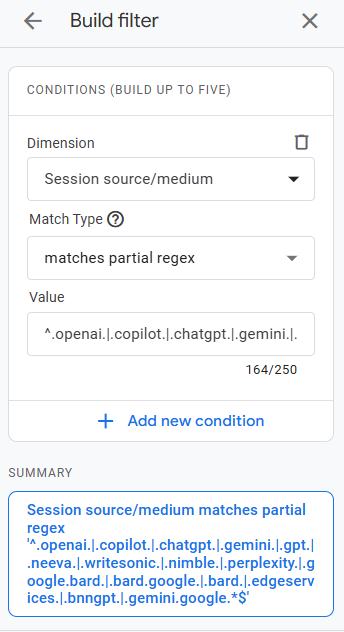
As you can see, the regex is filtering out the session sources for referrals from ChatGPT, Copilot, OpenAI, Gemini, and so on.
You can customize this to include the domains of any AI traffic source you want to filter for. For example, if you wanted ChatGPT only, then exclude all the rest.
There are many ways to do this, you don’t have to use regex – you could just use ‘Contains’ as the match type and then add in the domain you want to look for.
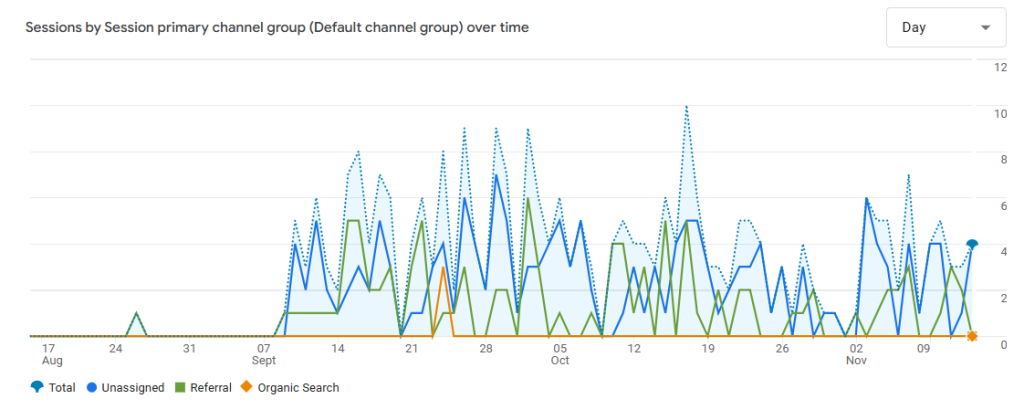
The result of using the regex above is that it checks most of the common AI referrers, and will give you something like this as an output:
Can You Track For Different Keywords?
Now, you’re probably quickly realising the issue here – how are you supposed to know what keywords generated the AI referral traffic you have now found using GA4?
Unfortunately, there is no way to track the exact keywords or prompts used in the different AI chatbots that then led to the traffic (for now). Most of these ‘keywords’ tend to be extremely long tail and conversational, which is one reason why they convert very well, with some studies saying up to 3x better.
All hope isn’t lost, though. There are some things you can do to get an idea of your AI visibility, including:
- Use AI tracking tools to monitor specific keywords and conversational phrases in AI
- Use filters on Google Search Console to uncover conversational queries that are shown in AI overviews for your brand
Let’s take a look at the steps you can take to start understanding your AI traffic.
How To See Google AI Overview Visibility
Before we get into estimating traffic from AI referrals, let’s take a look at a quick ‘trick’ you can use in Google Search Console.
This, again, relies on some Regex. What we want to do here is filter Google Search Console impressions for queries that are longer than 70 characters.
You may wonder why we would even bother with this at all, but if you take the following regex – ^(?i)[\w\W\s\S]{70,}$ – and copy this into Query > Custom (regex) (matches regex) in search console, you will find lots of long tail queries that look like AI prompts rather than actual search terms.
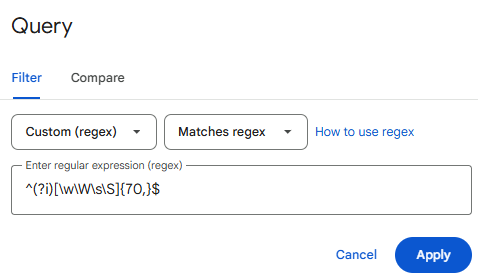
Google was supposed to bring AI mode directly into the search console, which would make this much easier, but for now, this is one of the easiest ways to uncover conversational queries used by Google’s AIOs and AI mode.
It works by showing impressions for long-tail queries that are often used to generate Google AI Overviews and terms in Google’s AI mode. It’s a little bit rough and ready right now, however, just try it out for yourself and see for yourself.
How To Estimate AI Traffic For Different Keywords
Now for the fun part: how do you estimate the amount of traffic you would receive from AI for different keywords?
The simple answer is that you’ll never be able to get a precise answer, as each keyword you target will show up for X number of related queries across X AI platforms, resulting in X number of visitors per month.
The only real way to do this is to get a very, very rough estimate based on keyword search volume.
Keyword-Based Approach
A keyword-based approach works well for AI overviews, as you can get pretty accurate keyword volume estimates via tools like Ahrefs. Simply take the keyword, determine the monthly volume, and then use some rough maths to see how much traffic the AIO would get.
For example, let’s take the keyword ‘best dog treats’ in the US. According to Ahrefs, this gets 6.6k searches per month:
- Confirm the search has an AI Overview (this one does)
- As per studies, AIOs get around 0.073 click-through rate, meaning 7,700 * 0.073 = 562 clicks
- So, 562 clicks distributed across the ten or so sources cited in the AI Overview (Yep, AIOs have decimated click-through rate)
This is a VERY ROUGH estimate, of course, and it doesn’t really take into account the brand reputation benefit of being visible in these high-volume AI Overviews.
So, the AI Overview method is more of a way of looking at total search volume available for a keyword (where an AI Overview is triggered, which occurs in 21% of all searches).
Monitoring AI Citations With Third-Party Tools
When it comes to AI sources like ChatGPT and Perplexity, our recommendation is to use a third-party tool to monitor your citations.
This won’t give you search volume data – as mentioned before, this isn’t something that is available yet – but it will give you an idea of where your brand stands for its most important terms in AI.
So, how do these tools actually work?
It’s pretty simple – you load up a bunch of terms you want to monitor, and the tool will search them periodically in ChatGPT and Perplexity (and any other AI tools it monitors). After that, it snapshots the results and lets you know if your brand is mentioned, quite similar to regular SEO tools…
What We Recommend To Clients
So, tracking the traffic from AI for specific terms is pretty much impossible, especially if you are planning to do this across sources like ChatGPT.
This leaves the question: What do we actually recommend to our clients?
Firstly, we recommend setting up the tracking in Google Analytics mentioned earlier so that they have an idea of how much traffic is coming from AI.
After that, we work with clients to figure out what terms they would like to show up for more prominently in AI, alongside what terms they already appear well for. This requires using a tracking tool, like I spoke about before.
After that, it’s all about consistent monitoring to see how AI traffic is changing over time and how their brand is represented/showing up for key terms. We can then help out with brand mentions to target specific queries that are vital for a brand.
It will be interesting to see how AI traffic changes over the next few years, so make sure you are tracking it properly – brands that don’t are going to be playing catch-up.
